
Understanding RDF and Turtle: Representing Knowledge as Triples
Learn how to represent entities, values, and relationships using RDF, write semantic data with Turtle, and build your first RDF graph with Python.


In the previous article, we explored the foundational vision behind the Semantic Web: giving data explicit meaning so applications can integrate information across system boundaries without bespoke glue code. We discussed why identifying entities, formalizing relationships, and reusing shared vocabularies make data vastly more durable and interoperable.
Now, it is time to move from architecture to practice.
How do we actually encode a book, its author, and its publisher into a data structure that arbitrary software can parse, validate, and traverse? How do we declare that a specific digital resource is a book, that it was written by a real person, and that it was released by an established organization?
The Resource Description Framework (RDF) provides the standardized data model for formulating these statements. Turtle (Terse RDF Triple Language) provides a clean, human-friendly syntax for writing and maintaining them.
In this tutorial, we will construct our understanding step by step. We will start with familiar JSON records, convert them into atomic RDF triples, master Turtle syntax conventions, and then use Python with RDFLib to load, inspect, traverse, and serialize a live knowledge graph.
By the end of this guide, you will be able to:
- Understand the atomic subject–predicate–object anatomy of an RDF triple.
- Differentiate between IRIs, string/typed literals, language tags, and blank nodes.
- Write clean, readable RDF graphs using idiomatic Turtle syntax.
- Leverage prefixes, semicolons, and commas to eliminate boilerplate.
- Create, navigate, and query an RDF graph programmatically using Python and RDFLib in a modern
uvworkspace. - Avoid common syntax pitfalls that trip up newcomers.
No prior Semantic Web experience is required. A basic familiarity with Python will help you get the most out of the hands-on code examples.
1. Why Do We Need RDF?
Let’s begin with a practical example.
Imagine we are building a digital catalog for a technical library containing books, authors, and publishing houses.
In a conventional application, you would likely represent a catalog entry as a standard JSON document:
{
  "id": "book-1",
  "title": "Understanding Knowledge Graphs",
  "author": "Alya Pratama",
  "publisher": "Example Press",
  "publication_year": 2024
}
This representation is concise, universally supported across web APIs, and effortless to parse into Python dictionaries or TypeScript objects.
However, consider what happens when our system needs to ingest catalog records from a partner university or an external research repository. The partner database might represent the exact same book using entirely different field names and schema assumptions:
{
  "record_id": "BK-104",
  "book_name": "Understanding Knowledge Graphs",
  "creator": "Alya Pratama",
  "publisher_name": "Example Press",
  "year": 2024
}
Both JSON payloads describe the exact same real-world reality. Yet structurally, they share zero keys.
A developer can write manual mapping adapters for two APIs. But what happens when you scale to fifty independent providers? What happens when one repository stores the author as a string, another stores it as an object with first_name and last_name, and a third references the author via an internal integer foreign key?
There is also a deeper identity ambiguity:
- Does the string
"Alya Pratama"uniquely distinguish this person from any other researcher sharing that name? - What if an author publishes under different name variants across their career?
- How can a consuming service know whether the publisher is an individual imprint or a multinational corporate entity?
In a flat document model, keys are local to the document. Their semantic interpretation depends entirely on proprietary documentation or implicit business logic trapped in application code.
RDF approaches data modeling from a fundamentally different perspective. Instead of organizing information into isolated, proprietary record shapes, RDF models everything as entities (resources) and the directed relationships that connect them.
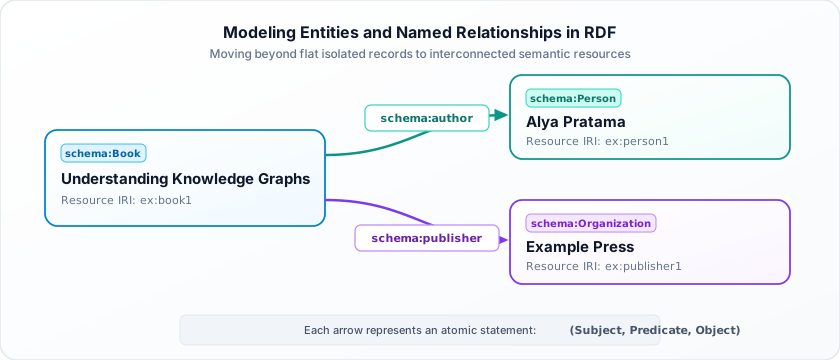
In this graph model:
- The book, the author, and the publisher are treated as distinct, identifiable entities rather than disposable string values inside an ad-hoc record.
- The connections between them are first-class, unambiguous relationships (
schema:author,schema:publisher).
RDF formalizes this graph model through elementary statements called triples.
[!NOTE] For the formal architectural definition, see the official W3C RDF 1.1 Concepts and Abstract Syntax specification.
2. Understanding the RDF Triple
At the heart of RDF lies a deceptively simple structure: the triple.
Every statement in an RDF graph expresses a single fact by connecting three components:
- Subject: The resource being described (the source node).
- Predicate: The property, characteristic, or relationship (the directed edge).
- Object: The target entity or literal value associated with the subject (the destination node).
Mathematically and structurally, every triple adheres to the following directed relationship:
Or, in general graph notation:
Let’s translate an English sentence into this structure:
The book has the title “Understanding Knowledge Graphs”.
We can express this statement as an atomic triple:
Subject:   book1
Predicate: hasTitle
Object:    "Understanding Knowledge Graphs"
Or compactly as an ordered 3-tuple:
Now suppose we want to declare who authored the book:
And which entity published it:
Notice the critical distinction here: person1 and publisher1 are resources, not plain strings. Because they are distinct nodes in our model, we can attach independent properties to them without altering the original book statement:
Putting all five statements together:
(book1, hasTitle,    "Understanding Knowledge Graphs")
(book1, hasAuthor,   person1)
(book1, publishedBy, publisher1)
(person1, hasName,   "Alya Pratama")
(publisher1, hasName, "Example Press")
This collection of five statements forms an RDF graph.
In RDF, an ordinary graph is defined as an unordered mathematical set of triples. It does not matter whether statement 1 was written before statement 5. When two different organizations independently publish statements about person1 or book1, merging their knowledge is as straightforward as taking the set union of their triples.
2.1. Permitted Terms in a Triple
RDF enforces precise rules regarding which types of terms may appear in each position of a triple:
| Triple Position | Permitted Term Types | Purpose |
|---|---|---|
| Subject | IRI or Blank Node | The resource being described or identified. |
| Predicate | IRI | The property or relationship type linking subject to object. |
| Object | IRI, Blank Node, or Literal | Another entity, an anonymous structure, or a primitive value. |
[!IMPORTANT] A literal (such as a string, integer, or date) can only appear in the object position. You cannot make a literal the subject or predicate of a triple. For instance,
"Alya Pratama" hasAuthor book1is invalid in the RDF abstract data model.
3. From Individual Triples to an RDF Graph
A single triple represents an isolated fact. When multiple triples share subjects or objects, they naturally link together into an interconnected knowledge graph.
Let’s return to our technical library and collect all the statements we wish to capture:
- A resource (
book1) has the title “Understanding Knowledge Graphs”. - The author is
person1. - The publisher is
publisher1. - The publication date is April 12, 2024.
person1is classified as a Person.publisher1is classified as an Organization.
When combined, these statements assemble into the graph visualized in Figure 2:
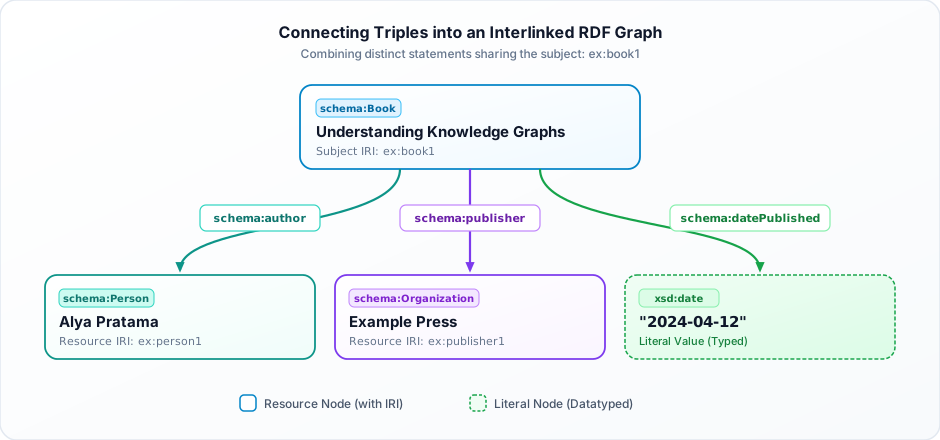
ex:book1) coalesce into an interconnected RDF graph.
Why is this graph structure so powerful?
Imagine our catalog later acquires a second title written by the same author:
We do not create a duplicate person or worry whether the string "Alya Pratama" was spelled identically. Both book1 and book2 simply point to the exact same node: person1.
If we later add biographical details, affiliations, or an ORCID identifier to person1, those additions immediately enrich every book connected to that author without touching the book records themselves.
4. Understanding IRIs: Giving Resources Global Identifiers
In local code, writing placeholders like book1 or person1 works fine. But how do we ensure that our identifier does not collide with another system’s book1?
RDF solves this through Internationalized Resource Identifiers (IRIs).
An IRI is an internationalized generalization of a URI (Uniform Resource Identifier) that allows characters from the universal character set (Unicode). In practice, Web-based HTTP IRIs are standard:
https://example.org/books/book1
https://example.org/people/person1
https://example.org/publishers/publisher1
By using domain names that you control, your resource identifiers are globally disambiguated:
<https://example.org/books/book1>
    ──schema:author──>
<https://example.org/people/person1>
When an external dataset wants to state that Alya Pratama also reviewed an article or received a research grant, they can directly cite <https://example.org/people/person1>. The datasets merge automatically without string reconciliation heuristics.
4.1. Is an IRI the Same as a URL?
Not strictly.
- A URL (Uniform Resource Locator) specifies an address where a digital representation can be located and retrieved over a network (e.g., fetching an HTML document via HTTP
GET). - An IRI is a broader conceptual identifier. It names an abstract or real-world thing—such as a physical book, a human being, a company, or a philosophical concept.
A person does not live on a web server. However, by using an HTTP IRI like https://example.org/people/person1, a web server can be configured to return an RDF or JSON-LD description of that person when queried by a client. This convention forms the bedrock of Linked Data principles.
5. Understanding Literals: Representing Values
While IRIs connect resources to other resources, many properties describe concrete values: titles, dimensions, timestamps, quantities, or prices.
In RDF, these terminal values are called literals.
Examples of literals:
"Understanding Knowledge Graphs"(text string)2024(integer)true(boolean)"2024-04-12"(date)
Consider the semantic difference between these two statements:
ex:book1 schema:author ex:person1 .
ex:book1 schema:name   "Understanding Knowledge Graphs" .
The first statement points to a resource (ex:person1), which can have its own outgoing edges (nationality, affiliation, email). The second points to a literal ("Understanding Knowledge Graphs"), which is a terminal leaf node in the graph.
5.1. Datatypes
Literals can be explicitly typed using standard XML Schema Datatypes (XSD):
ex:book1 ex:publicationYear "2024"^^xsd:integer .
ex:book1 schema:datePublished "2024-04-12"^^xsd:date .
ex:book1 ex:price "29.99"^^xsd:decimal .
The ^^ syntax binds the value to an explicit datatype URI, allowing semantic processors to distinguish between the number 2024 and the four-character string "2024".
Under RDF 1.1, any simple string without an explicit datatype annotation (e.g., "Alya Pratama") is automatically assigned the datatype xsd:string.
5.2. Language-Tagged Literals
Textual values often have distinct linguistic translations. RDF supports internationalization natively using language tags (RFC 5646):
ex:book1 schema:name "Understanding Knowledge Graphs"@en .
ex:book1 schema:name "Memahami Knowledge Graphs"@id .
ex:book1 schema:name "Comprendre les Graphes de Connaissances"@fr .
The @en, @id, and @fr suffixes explicitly identify the natural language of the literal, allowing multi-lingual applications to render the appropriate label for the user’s locale without modifying the graph topology.
6. What Is Turtle?
Now that we understand the RDF data model, how do we write it down?
If we write every triple using fully qualified IRIs, documents quickly become verbose and exhausting to read:
<https://example.org/books/book1> <http://www.w3.org/1999/02/22-rdf-syntax-ns#type> <https://schema.org/Book> .
<https://example.org/books/book1> <https://schema.org/name> "Understanding Knowledge Graphs"@en .
<https://example.org/books/book1> <https://schema.org/datePublished> "2024-04-12"^^<http://www.w3.org/2001/XMLSchema#date> .
Repeating <https://example.org/...> on every line clutters the document.
Turtle (Terse RDF Triple Language) was designed specifically to solve this problem. It is a compact, human-readable serialization for RDF graphs standardized by the W3C Turtle Recommendation.
Turtle introduces three major conveniences:
- Namespace prefixes to shorten long IRIs.
- Punctuation shorthand (
;and,) to group statements sharing subjects or predicates. - Keyword shortcuts such as
aforrdf:type.
6.1. Declaring Prefixes
Instead of repeating full IRIs, Turtle allows you to declare prefix bindings at the top of the file:
@prefix ex:     <https://example.org/> .
@prefix schema: <https://schema.org/> .
@prefix xsd:    <http://www.w3.org/2001/XMLSchema#> .
With these prefixes declared, <https://schema.org/name> simplifies to:
schema:nameAnd <https://example.org/book1> simplifies to:
ex:book1[!NOTE] Prefixes are purely syntactic shortcuts for human convenience. When an RDF parser loads Turtle into memory, it resolves every prefixed name (
prefix:localName) back to its absolute IRI.
6.2. Why Reuse Schema.org?
Rather than inventing our own arbitrary property names like ex:hasAuthorName or ex:bookWriter, we reuse standardized vocabularies like Schema.org:
| Term | Category | Description |
|---|---|---|
schema:Book | Class | A published book. |
schema:Person | Class | An individual human being. |
schema:Organization | Class | An institution, corporation, or publisher. |
schema:name | Property | The primary human-readable title or name. |
schema:author | Property | The creator or author of a creative work. |
schema:publisher | Property | The organization responsible for publication. |
schema:datePublished | Property | The formal publication date. |
Reusing established vocabulary terms ensures that search engines, knowledge bases, and partner applications immediately comprehend our dataset’s meaning.
7. Writing Your First Turtle Document
Let’s assemble our knowledge and build a complete Turtle document representing our digital library.
Create a new file named books.ttl (the standard .ttl extension stands for Turtle):
@prefix ex:     <https://example.org/> .
@prefix schema: <https://schema.org/> .
@prefix xsd:    <http://www.w3.org/2001/XMLSchema#> .

# Description of the Book
ex:book1 a schema:Book ;
    schema:name "Understanding Knowledge Graphs"@en ;
    schema:author ex:person1 ;
    schema:publisher ex:publisher1 ;
    schema:datePublished "2024-04-12"^^xsd:date .

# Description of the Author
ex:person1 a schema:Person ;
    schema:name "Alya Pratama" ;
    schema:givenName "Alya" ;
    schema:familyName "Pratama" .

# Description of the Publisher
ex:publisher1 a schema:Organization ;
    schema:name "Example Press" .
Let’s analyze what makes this document both elegant and expressive.
7.1. The Book Resource
ex:book1 a schema:Book ;
    schema:name "Understanding Knowledge Graphs"@en ;
    schema:author ex:person1 ;
    schema:publisher ex:publisher1 ;
    schema:datePublished "2024-04-12"^^xsd:date .
This single block encodes five triples sharing the subject ex:book1:
ex:book1is an instance of classschema:Book.- Its English title is
"Understanding Knowledge Graphs". - Its author is the resource
ex:person1. - Its publisher is the resource
ex:publisher1. - Its release date is typed as an
xsd:date.
Notice the character a. In Turtle, a is a built-in alias for rdf:type (http://www.w3.org/1999/02/22-rdf-syntax-ns#type). Writing ex:book1 a schema:Book . is identical to writing ex:book1 rdf:type schema:Book ..
7.2. The Author Resource
ex:person1 a schema:Person ;
    schema:name "Alya Pratama" ;
    schema:givenName "Alya" ;
    schema:familyName "Pratama" .
Here we describe ex:person1 as an independent entity:
- It has a full display name (
"Alya Pratama"). - It breaks down the name into structured components (
schema:givenNameandschema:familyName).
Other resources across the organization can link to ex:person1 without re-declaring these details.
7.3. The Publisher Resource
ex:publisher1 a schema:Organization ;
    schema:name "Example Press" .
In total, this clean 18-line document defines 11 distinct RDF triples.
8. Turtle Punctuation: Periods, Semicolons, and Commas
Writing Turtle correctly requires understanding its punctuation rules. These rules function much like English grammar:
8.1. The Period (.)
A period terminates a complete statement sequence:
ex:book1 schema:name "Understanding Knowledge Graphs" .Missing the trailing period is the most common beginner error and causes the parser to fail.
8.2. The Semicolon (;)
A semicolon allows multiple predicate–object pairs to share the same subject:
ex:book1 schema:name "Understanding Knowledge Graphs" ;
    schema:author ex:person1 ;
    schema:publisher ex:publisher1 .
This is shorthand for three independent triples:
ex:book1 schema:name "Understanding Knowledge Graphs" .
ex:book1 schema:author ex:person1 .
ex:book1 schema:publisher ex:publisher1 .
The semicolon does not create a special relationship; it is pure syntactic sugar that keeps files readable.
8.3. The Comma (,)
A comma allows multiple objects to share the same subject and predicate:
ex:book1 schema:keywords "RDF", "Turtle", "Linked Data" .This expands into three separate triples:
ex:book1 schema:keywords "RDF" .
ex:book1 schema:keywords "Turtle" .
ex:book1 schema:keywords "Linked Data" .
In RDF, multi-valued properties do not require special array or list wrappers; you simply declare multiple triples with the same subject and predicate.
9. Understanding Blank Nodes in Turtle
So far, every resource has had an explicit IRI (like ex:book1 or ex:person1).
However, sometimes you need to model an internal data structure that has no identity outside the current context. For example, consider an organization’s physical mailing address:
- Street, City, Country, Postal Code.
Does that specific address instance need a permanent, globally unique public IRI? Usually not.
In RDF, an anonymous resource without an explicit IRI is known as a blank node (bnode).
In Turtle, blank nodes are declared cleanly using square brackets [ ... ]:
@prefix ex:     <https://example.org/> .
@prefix schema: <https://schema.org/> .

ex:publisher1 a schema:Organization ;
    schema:name "Example Press" ;
    schema:address [
        a schema:PostalAddress ;
        schema:addressLocality "Bandar Lampung" ;
        schema:addressCountry "ID"
    ] .
Figure 3 illustrates how this anonymous structure attaches to the parent organization:
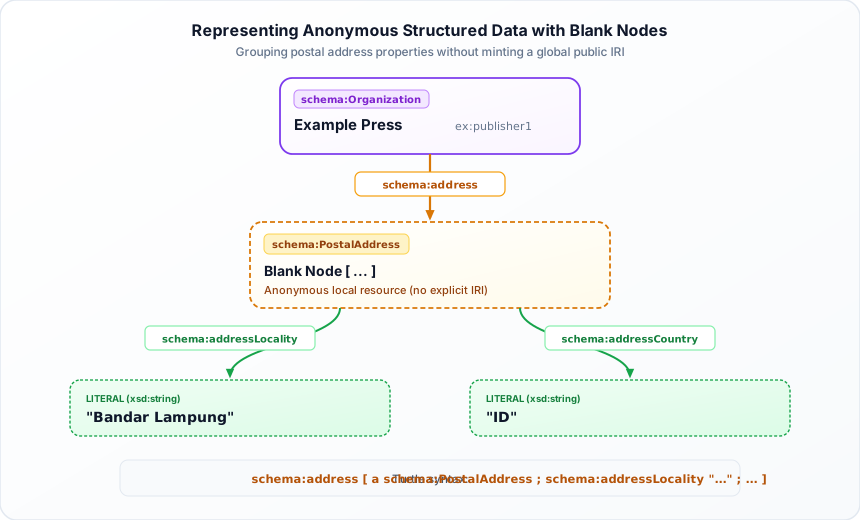
Under the hood, the parser assigns the blank node a generated local identifier (such as _:b0).
[!WARNING] Blank node identifiers are ephemeral and scoped only to the local file. Two separate RDF graphs containing
_:b0do not refer to the same entity. If a resource must be reliably referenced across multiple datasets, assign it an explicit IRI instead.
10. Deconstructing Turtle into Pure RDF Triples
To appreciate what Turtle does, let’s see how our compact book block:
ex:book1 a schema:Book ;
    schema:name "Understanding Knowledge Graphs"@en ;
    schema:author ex:person1 ;
    schema:publisher ex:publisher1 ;
    schema:datePublished "2024-04-12"^^xsd:date .
expands into raw, un-abbreviated N-Triples:
<https://example.org/book1> <http://www.w3.org/1999/02/22-rdf-syntax-ns#type> <https://schema.org/Book> .
<https://example.org/book1> <https://schema.org/name> "Understanding Knowledge Graphs"@en .
<https://example.org/book1> <https://schema.org/author> <https://example.org/person1> .
<https://example.org/book1> <https://schema.org/publisher> <https://example.org/publisher1> .
<https://example.org/book1> <https://schema.org/datePublished> "2024-04-12"^^<http://www.w3.org/2001/XMLSchema#date> .
Both representations produce the exact same in-memory graph. Turtle changes how we read and write RDF; it does not change the underlying RDF model.
11. Hands-on with Python: Parsing Graphs with RDFLib
Now let’s interact with our RDF data programmatically.
In Python, the standard library for semantic data processing is RDFLib. It provides graph containers, parsers for Turtle, JSON-LD, and RDF/XML, serializers, and a SPARQL 1.1 query engine.
We will manage our project using uv.
Step 1: Initialize the Project
Create an isolated project directory:
uv init --bare --python 3.12 rdf-tutorial
cd rdf-tutorial
Step 2: Install RDFLib
Add RDFLib to your project dependencies:
uv add rdflibuv resolves the dependency tree and provisions a high-speed virtual environment automatically.
Step 3: Create the Turtle File
Save our complete Turtle document in the project root as books.ttl:
@prefix ex:     <https://example.org/> .
@prefix schema: <https://schema.org/> .
@prefix xsd:    <http://www.w3.org/2001/XMLSchema#> .

ex:book1 a schema:Book ;
    schema:name "Understanding Knowledge Graphs"@en ;
    schema:author ex:person1 ;
    schema:publisher ex:publisher1 ;
    schema:datePublished "2024-04-12"^^xsd:date .

ex:person1 a schema:Person ;
    schema:name "Alya Pratama" ;
    schema:givenName "Alya" ;
    schema:familyName "Pratama" .

ex:publisher1 a schema:Organization ;
    schema:name "Example Press" .
Step 4: Write the Inspection Script
Create main.py in the same directory:
from pathlib import Path
from rdflib import Graph, Namespace

BASE_DIR = Path(__file__).resolve().parent
TURTLE_FILE = BASE_DIR / "books.ttl"

# Define RDF namespaces
EX = Namespace("https://example.org/")
SCHEMA = Namespace("https://schema.org/")


def main() -> None:
    # 1. Initialize an in-memory RDF graph
    graph = Graph()

    # 2. Parse the Turtle file
    graph.parse(str(TURTLE_FILE), format="turtle")
    print(f"Total triples loaded: {len(graph)}")

    # 3. Iterate and inspect all statements
    print("\n--- Listing All Triples in Graph ---")
    for s, p, o in graph:
        print(f"Subject:   {s}")
        print(f"Predicate: {p}")
        print(f"Object:    {o}\n")

    # 4. Traverse relationships starting from the book
    book = EX.book1

    title = next(graph.objects(book, SCHEMA.name), None)
    author_node = next(graph.objects(book, SCHEMA.author), None)
    publisher_node = next(graph.objects(book, SCHEMA.publisher), None)

    # Follow edges to retrieve connected entity names
    author_name = (
        next(graph.objects(author_node, SCHEMA.name), None)
        if author_node
        else None
    )
    publisher_name = (
        next(graph.objects(publisher_node, SCHEMA.name), None)
        if publisher_node
        else None
    )

    print("--- Extracted Catalog Information ---")
    print(f"Book Title:      {title}")
    print(f"Author Node:     {author_node}")
    print(f"Author Name:     {author_name}")
    print(f"Publisher Node:  {publisher_node}")
    print(f"Publisher Name:  {publisher_name}")

    # 5. Serialize the graph back to another format or file
    output_file = BASE_DIR / "books-serialized.ttl"
    graph.serialize(destination=str(output_file), format="turtle")
    print(f"\nGraph successfully re-serialized to: {output_file.name}")


if __name__ == "__main__":
    main()
Step 5: Run the Code
Execute the script via uv run:
uv run main.pyExpected Output
Total triples loaded: 11

--- Listing All Triples in Graph ---
Subject:   https://example.org/book1
Predicate: http://www.w3.org/1999/02/22-rdf-syntax-ns#type
Object:    https://schema.org/Book
...

--- Extracted Catalog Information ---
Book Title:      Understanding Knowledge Graphs
Author Node:     https://example.org/person1
Author Name:     Alya Pratama
Publisher Node:  https://example.org/publisher1
Publisher Name:  Example Press

Graph successfully re-serialized to: books-serialized.ttl
[!NOTE] The order in which triples are printed during iteration may vary between runs. Because an RDF graph is a mathematical set of statements, order is never guaranteed.
12. Demystifying the Python Implementation
Let’s break down the essential RDFLib primitives used in our script:
12.1. Graph()
graph = Graph()Instantiates an empty RDF graph container.
12.2. graph.parse()
graph.parse(str(TURTLE_FILE), format="turtle")Reads the input stream, verifies syntactic validity, expands prefixes, and populates the graph. If a line is malformed, RDFLib raises a detailed ParserError pinpointing the exact line and column.
12.3. Namespaces
EX = Namespace("https://example.org/")
SCHEMA = Namespace("https://schema.org/")
The Namespace helper allows Pythonic dot-notation access to IRIs:
EX.book1resolves toURIRef("https://example.org/book1").SCHEMA.authorresolves toURIRef("https://schema.org/author").
12.4. Graph Navigation via graph.objects()
author_node = next(graph.objects(book, SCHEMA.author), None)
author_name = next(graph.objects(author_node, SCHEMA.name), None)
The graph.objects(subject, predicate) method queries the graph for all object terms matching the given subject and predicate pattern.
Here we perform a two-step graph traversal:
- Start at
ex:book1. - Follow the
schema:authoredge to findex:person1. - Follow the
schema:nameedge fromex:person1to retrieve the literal"Alya Pratama".
This demonstrates how semantic applications navigate relationships natively without SQL JOIN clauses.
13. RDF vs. Turtle: Separating Data Model from Syntax
A frequent source of confusion is conflating RDF with Turtle.
- RDF is the abstract data model: A graph of nodes and directed edges defined as triples of
(Subject, Predicate, Object). - Turtle is one textual syntax for encoding that model into characters.
Think of it like data structures and formats: an abstract key-value dictionary can be written as JSON, YAML, or TOML. In the same way, an RDF graph can be serialized into several standardized formats:
| Format | Extension | Primary Use Case |
|---|---|---|
| Turtle | .ttl | Human authoring, configuration, and documentation. |
| JSON-LD | .jsonld | Modern web APIs, search engine SEO tags, and JavaScript web apps. |
| N-Triples | .nt | High-throughput streaming, big-data pipelines, and bulk database dumps. |
| RDF/XML | .rdf | Legacy enterprise standards and historical ontologies. |
Regardless of whether you write data in Turtle or JSON-LD, the underlying graph of facts is mathematically identical.
14. Common Turtle Mistakes to Avoid
Here are six common mistakes encountered when writing Turtle and how to fix them:
1. Missing the Final Period
# Incorrect:
ex:book1 schema:name "Understanding Knowledge Graphs"

# Correct:
ex:book1 schema:name "Understanding Knowledge Graphs" .
2. Using Undeclared Prefixes
# Incorrect if @prefix schema: was omitted:
ex:book1 schema:name "Understanding Knowledge Graphs" .

# Correct:
@prefix schema: <https://schema.org/> .
ex:book1 schema:name "Understanding Knowledge Graphs" .
3. Unquoted String Literals
# Incorrect:
ex:person1 schema:name Alya Pratama .

# Correct:
ex:person1 schema:name "Alya Pratama" .
4. Confusing Semicolons and Commas
- Use
;when the predicate changes for the same subject. - Use
,when the predicate is identical and only the object value changes.
# 1 subject, 2 distinct properties:
ex:book1 schema:name "Understanding Knowledge Graphs" ;
    schema:keywords "RDF", "Turtle" .  # 2 values for the same property
5. Using a Plain Literal Instead of an Identified Resource
# Syntactically valid, but semantically limited:
ex:book1 schema:author "Alya Pratama" .

# Better: Links to an independent resource node
ex:book1 schema:author ex:person1 .
ex:person1 schema:name "Alya Pratama" .
If you ever need to record the author’s ORCID, homepage, or other publications, the resource link makes that effortless.
6. Assuming Triples Preserve File Order
RDF graphs are unordered sets. Never write code that assumes triple #1 will appear before triple #2. Always query your data by pattern or relationship rather than position.
15. Summary of Key Concepts
Let’s recap what we have established:
- Triples: The fundamental atom of semantic data. Every statement consists of a Subject, Predicate, and Object ().
- RDF Graph: An unordered mathematical set of triples forming a directed labeled graph.
- IRIs: Globally unique identifiers that prevent naming collisions across systems.
- Literals: Terminal values (strings, integers, dates) that can only occupy the object position.
- Blank Nodes: Anonymous structured nodes used for grouping without public IRIs.
- Turtle: An expressive, compact W3C syntax featuring prefixes, semicolons, and commas.
- Python + RDFLib: A mature ecosystem for loading, traversing, and serializing semantic graphs with minimal boilerplate.
What’s Next?
We now know how to model entities and relationships as triples, write them cleanly in Turtle, and manipulate them with Python.
However, as knowledge graphs grow to thousands or millions of triples, manually traversing edges with Python loops becomes inefficient. We need a declarative, standard query language specifically designed for pattern matching over graph structures.
In the next article of this series, we will dive into SPARQL—the query language of the Semantic Web. We will learn how to write triple patterns, filter results, perform federated queries, and extract answers from our book graph using Python and RDFLib.
References and Further Reading
Related Articles
More writings on Semantic Web and related technologies.
Semantic Web Explained: From Data to Meaning with RDF and Linked Data
Understanding how machines can work with structured meaning, connect information across different sources, and build a more interoperable Web.

Building Your First REST API with FastAPI and uv
From zero to a working REST API: learn how to build, validate, test, and run a production-ready Python API using FastAPI and uv.