
Building Your First REST API with FastAPI and uv
From zero to a working REST API: learn how to build, validate, test, and run a production-ready Python API using FastAPI and uv.


Modern software applications almost never operate in total isolation. A single-page web application needs to fetch account data from a backend service, a mobile app needs to synchronize user interactions, and an artificial intelligence agent or microservice needs a predictable HTTP interface to accept tasks and return inference results.
At the center of this ecosystem sits the REST API (Representational State Transfer).
A REST API allows heterogeneous systems to communicate over HTTP through standardized endpoints, predictable HTTP verbs, structured payloads, and consistent status codes. The client does not care whether your backend is written in Python, Go, or Rust—what matters is the contract: send valid JSON to an endpoint, receive a well-defined response back.
While Python offers several web frameworks, FastAPI has emerged as one of the most productive tools for modern API engineering. Powered by standard Python type annotations and Pydantic validation, FastAPI pairs speed of development with high runtime performance, automatic interactive documentation, and clean error ergonomics.
In our previous articles, we established how uv simplifies Python versioning, virtual environments, and package lockfiles. In this tutorial, we will apply that same lightweight, lightning-fast workflow to build a complete task management REST API from scratch.
By the end of this guide, you will have a working API supporting full CRUD (Create, Read, Update, Delete) operations, automatic schema validation, custom error responses, interactive Swagger docs, and automated integration tests written with pytest and HTTPX.
1. Understanding What a REST API Is
Before writing code, let’s step back and inspect the engineering problem we are solving.
Suppose we need to power a task management system. Clients need to:
- List all available tasks.
- Inspect a specific task by its unique identifier.
- Create a new task.
- Update the details or completion status of an existing task.
- Delete a task that is no longer needed.
In a RESTful architecture, every resource is identified by a URL path, and operations on that resource are expressed through standard HTTP verbs:
| HTTP Method | Endpoint | Purpose | Expected Status Code | Request Body |
|---|---|---|---|---|
| GET | / | Returns service welcome message | 200 OK | None |
| GET | /health | Liveness check for uptime monitors | 200 OK | None |
| GET | /tasks | Retrieves all tasks | 200 OK | None |
| GET | /tasks?completed=true | Filters tasks by completion status | 200 OK | Query Param |
| GET | /tasks/{task_id} | Retrieves a single task by ID | 200 OK / 404 Not Found | None |
| POST | /tasks | Creates a new task | 201 Created / 422 Unprocessable | JSON (TaskInput) |
| PUT | /tasks/{task_id} | Replaces an existing task | 200 OK / 404 Not Found | JSON (TaskInput) |
| DELETE | /tasks/{task_id} | Removes a task by ID | 204 No Content / 404 Not Found | None |
Key REST Design Conventions:
- Path Parameters (
{task_id}): Embed the target resource identity into the URL (GET /tasks/1). - Query Parameters (
?completed=true): Filter, sort, or paginate collections without changing the underlying resource identity. - HTTP Semantics:
GETis idempotent and safe; it must never mutate server state.POSTcreates a new entity and returns201 Created.PUTreplaces the resource state.DELETEdestroys the resource and returns204 No Contentwhen successful.
2. Why FastAPI?
Python developers historically had to choose between heavyweight frameworks with batteries included (like Django) or lightweight microframeworks that required manual request parsing and validation (like Flask).
FastAPI hits the sweet spot by building directly on modern language features:
- Type Annotations & Automatic Coercion: You declare parameter types using standard Python typing (
task_id: int). FastAPI automatically parses the string path segment, converts it into an integer, and returns a clean422error if the client sends letters instead of digits. - Pydantic Validation: Request bodies are defined as Pydantic classes with explicit constraints (e.g., minimum string lengths, optional fields, default values). Malformed payloads never reach your business logic.
- Auto-Generated Documentation: FastAPI compiles an OpenAPI schema dynamically from your code annotations and hosts an interactive Swagger UI (
/docs) and ReDoc interface (/redoc) without any third-party plugins. - Native uv Integration: Because FastAPI relies heavily on modular packaging and modern Python standards, running and maintaining it under
uvis seamless and virtually instantaneous.
3. Creating the Project with uv
We will start with an isolated workspace named task-api using Python 3.12.
Step 1: Verify uv Installation
Open your terminal and confirm that uv is ready:
uv --versionStep 2: Initialize a Bare Project
We pass --bare so that uv sets up a clean pyproject.toml without auto-generating placeholder files:
uv init --bare --python 3.12 task-api
cd task-api
Step 3: Install FastAPI with the Standard CLI
Install FastAPI alongside its standard server dependencies (including Uvicorn and the new fastapi CLI):
uv add "fastapi[standard]"Step 4: Install Testing Tooling
Add pytest and httpx under development dependencies so they do not pollute our production dependencies:
uv add --dev pytest httpxSynchronize the virtual environment:
uv syncuv automatically creates .venv/, pins exact versions in uv.lock, and prepares our runtime in less than two seconds.
4. Initial Project Anatomy
At this point, our project directory looks like this:
task-api/
├── .venv/
├── .python-version
├── pyproject.toml
└── uv.lock| Component | Responsibility in the Workspace |
|---|---|
pyproject.toml | Declares direct project dependencies (fastapi) and dev tools (pytest, httpx). |
uv.lock | Cryptographically pinned dependency tree ensuring reproducible installs across team machines. |
.python-version | Pins the target interpreter version (3.12) used by uv run. |
.venv/ | The isolated local virtual environment containing all installed packages. |
5. Building the First FastAPI Minimal Prototype
Create a file named main.py in the root of task-api and paste the following initial server implementation:
from fastapi import FastAPI

app = FastAPI(
    title="Task API",
    description="A lightweight REST API for managing tasks.",
    version="1.0.0",
)

@app.get("/")
def read_root() -> dict[str, str]:
    return {"message": "Welcome to the Task API!"}

@app.get("/health")
def health_check() -> dict[str, str]:
    return {"status": "ok"}
Code Walkthrough:
app = FastAPI(...): Instantiates the central ASGI application object that registers routes, holds OpenAPI metadata, and handles HTTP routing.@app.get("/"): A path operation decorator instructing FastAPI to dispatch all incoming HTTPGETrequests for the root path toread_root().- Synchronous Functions: Notice we used standard
def read_root()rather thanasync def. FastAPI executes standard synchronous functions in an internal threadpool, preventing blocking behaviors while keeping simple endpoints clean.
6. Running the API with the FastAPI CLI
Launch the development server using uv run:
uv run fastapi dev main.pyFastAPI detects main.py, starts an auto-reloading Uvicorn server, and binds to:
http://127.0.0.1:8000Open a web browser or run curl:
curl http://127.0.0.1:8000/
# Output: {"message":"Welcome to the Task API!"}

curl http://127.0.0.1:8000/health
# Output: {"status":"ok"}
The server is live, responding with valid JSON headers, and automatically hot-reloading on every file change.
7. Exploring Automatic Interactive Documentation
One of FastAPI’s greatest developer experience features is that you never need to write external API documentation by hand.
While the server is running, navigate to:
http://127.0.0.1:8000/docs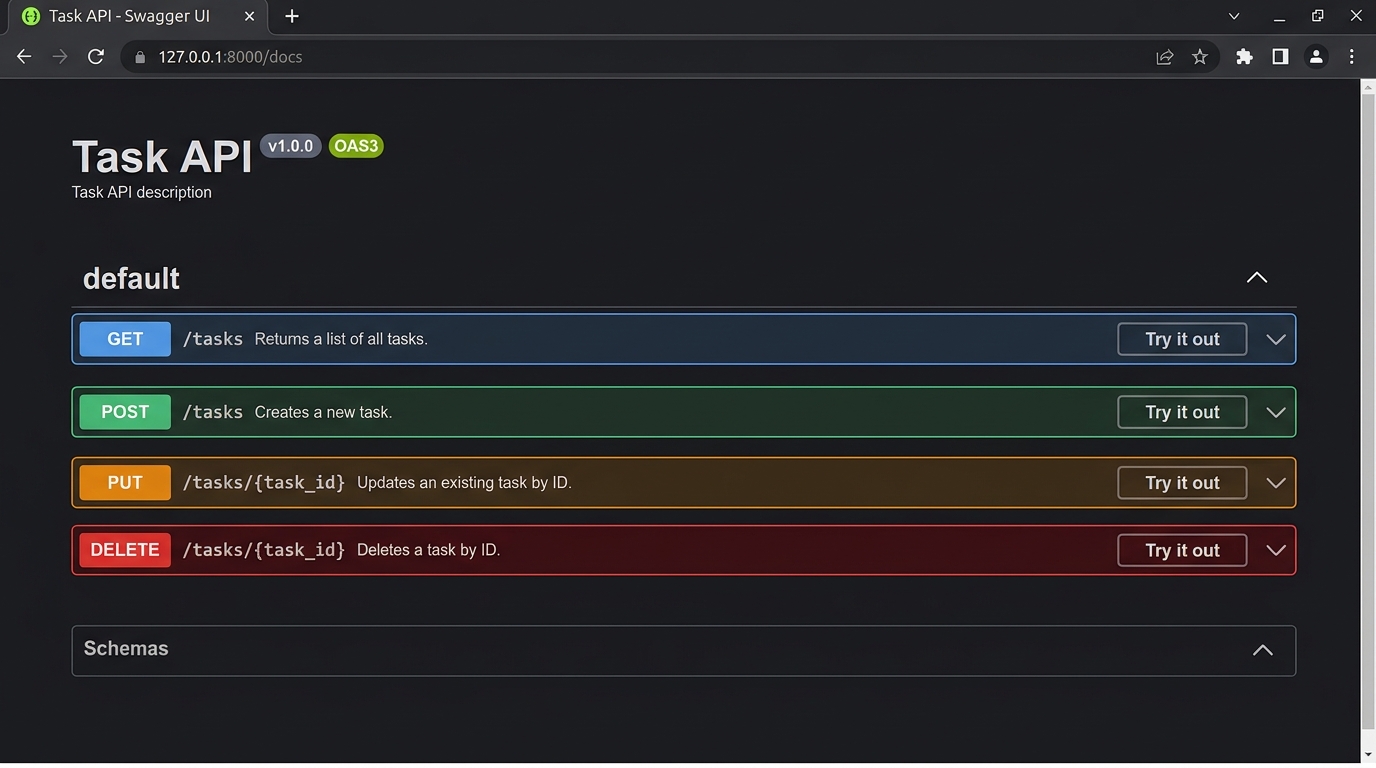
/docs for the Task API.
This renders an interactive Swagger UI generated on the fly:
- Every registered route is cataloged with its HTTP verb and path.
- Clicking Try it out -> Execute dispatches a real HTTP request directly from your browser.
- You can inspect request headers, query parameters, returned status codes, and response bodies in real time.
For an alternative layout, open:
http://127.0.0.1:8000/redocAnd to inspect the machine-readable schema used by client generators and SDK tooling:
http://127.0.0.1:8000/openapi.json8. Designing the Task Data Model with Pydantic
Now let’s expand the prototype into a complete, full-featured Task Management API.
Each task entity in our domain contains four attributes:
| Field Name | Python Type | Domain Meaning | Validation Rule |
|---|---|---|---|
id | int | Unique server-assigned identifier | Assigned by backend, never submitted by client |
title | str | Short task summary | Required; length between 1 and 100 characters |
description | str | None | Detailed notes | Optional; default None; maximum 500 characters |
completed | bool | Completion status flag | Optional; defaults to False |
Replace the contents of main.py with the complete application:
from typing import Annotated
from fastapi import FastAPI, HTTPException, Query, status
from pydantic import BaseModel, Field

app = FastAPI(
    title="Task API",
    description="A simple REST API for managing tasks.",
    version="1.0.0",
)

# ---------------------------------------------------------------------------
# Data Models (Pydantic Schemas)
# ---------------------------------------------------------------------------

class TaskInput(BaseModel):
    """Schema for client-provided data when creating or replacing a task."""
    title: str = Field(min_length=1, max_length=100, description="Task headline.")
    description: str | None = Field(default=None, max_length=500, description="Optional notes.")
    completed: bool = Field(default=False, description="Completion status flag.")


class Task(TaskInput):
    """Schema for stored tasks, including the server-generated identifier."""
    id: int


# ---------------------------------------------------------------------------
# In-Memory Storage & Seed State
# ---------------------------------------------------------------------------

tasks: dict[int, Task] = {
    1: Task(
        id=1,
        title="Learn uv",
        description="Understand modern Python environment and lockfile management.",
        completed=True,
    ),
    2: Task(
        id=2,
        title="Build a REST API",
        description="Practice building, validating, and testing an API with FastAPI.",
        completed=False,
    ),
}

next_task_id: int = 3


# ---------------------------------------------------------------------------
# Endpoints
# ---------------------------------------------------------------------------

@app.get("/", tags=["General"])
def read_root() -> dict[str, str]:
    return {"message": "Welcome to the Task API!"}


@app.get("/health", tags=["General"])
def health_check() -> dict[str, str]:
    return {"status": "ok"}


@app.get("/tasks", response_model=list[Task], tags=["Tasks"])
def list_tasks(
    completed: Annotated[
        bool | None,
        Query(description="Filter tasks by completion status."),
    ] = None,
) -> list[Task]:
    """Retrieve all tasks, with optional boolean filtering by completion."""
    task_list = list(tasks.values())
    if completed is not None:
        task_list = [task for task in task_list if task.completed == completed]
    return task_list


@app.get("/tasks/{task_id}", response_model=Task, tags=["Tasks"])
def get_task(task_id: int) -> Task:
    """Retrieve a single task by its integer identifier."""
    task = tasks.get(task_id)
    if task is None:
        raise HTTPException(
            status_code=status.HTTP_404_NOT_FOUND,
            detail="Task not found.",
        )
    return task


@app.post(
    "/tasks",
    response_model=Task,
    status_code=status.HTTP_201_CREATED,
    tags=["Tasks"],
)
def create_task(task_input: TaskInput) -> Task:
    """Create a new task with automatic ID assignment."""
    global next_task_id
    task = Task(
        id=next_task_id,
        **task_input.model_dump(),
    )
    tasks[next_task_id] = task
    next_task_id += 1
    return task


@app.put("/tasks/{task_id}", response_model=Task, tags=["Tasks"])
def update_task(task_id: int, task_input: TaskInput) -> Task:
    """Replace an existing task's complete state."""
    if task_id not in tasks:
        raise HTTPException(
            status_code=status.HTTP_404_NOT_FOUND,
            detail="Task not found.",
        )
    updated_task = Task(
        id=task_id,
        **task_input.model_dump(),
    )
    tasks[task_id] = updated_task
    return updated_task


@app.delete(
    "/tasks/{task_id}",
    status_code=status.HTTP_204_NO_CONTENT,
    tags=["Tasks"],
)
def delete_task(task_id: int) -> None:
    """Delete a task by its identifier."""
    if task_id not in tasks:
        raise HTTPException(
            status_code=status.HTTP_404_NOT_FOUND,
            detail="Task not found.",
        )
    del tasks[task_id]
9. Architecture: The FastAPI Request & Validation Lifecycle
To understand why this architecture is so robust, let’s trace what happens under the hood when a client sends an HTTP request:
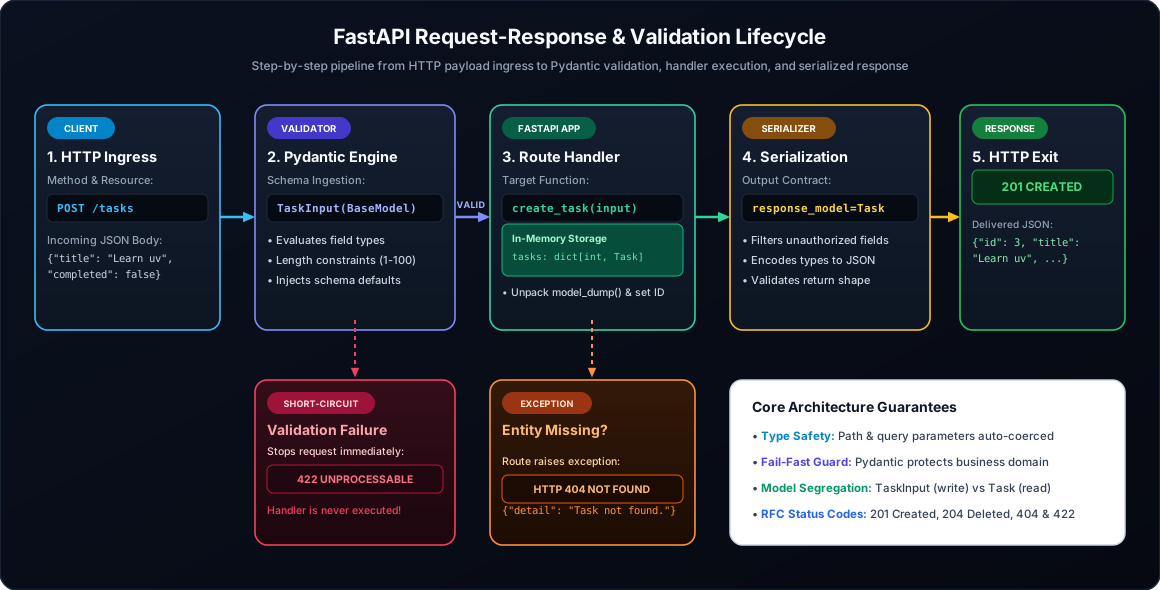
Architectural Insights:
- Short-Circuit Validation: Notice how Step 2 intercepts invalid payloads. If a client submits
{"title": ""}, FastAPI rejects the request withHTTP 422 Unprocessable Entitybeforecreate_task()is ever invoked. Your business logic never has to check for empty strings or corrupted types. - Input vs. Output Model Segregation:
TaskInputdefines what the client is permitted to write.Taskdefines what the server stores and returns. A client cannot spoof a database ID becauseTaskInputsimply does not acceptid. - Explicit Error Semantics: Instead of returning an informal JSON dictionary like
{"error": "not found"}with an HTTP200OK, we raise anHTTPException(status_code=404). Downstream consumers (frontend fetchers, mobile clients) can immediately inspect the standard HTTP response status code to trigger error handling.
10. Deep Dive into the CRUD Operations
Let’s break down each endpoint’s implementation details.
10.1 Reading All Tasks (GET /tasks)
@app.get("/tasks", response_model=list[Task], tags=["Tasks"])
def list_tasks(...) -> list[Task]:
    return list(tasks.values())
Returns a JSON array of task objects. FastAPI uses response_model=list[Task] to guarantee that every item in the returned list adheres to the Task schema.
10.2 Filtering with Query Parameters
completed: Annotated[bool | None, Query(...)] = NoneBecause completed is declared as a function argument without appearing in the route path, FastAPI interprets it as a URL query parameter:
GET /tasks?completed=truefilters for tasks wherecompleted == True.GET /tasks?completed=falsefilters for incomplete tasks.GET /tasksleavescompleted=Noneand returns all records.
FastAPI automatically parses strings like "true", "1", or "on" into a Python True.
10.3 Path Parameters & 404 Handling (GET /tasks/{task_id})
@app.get("/tasks/{task_id}", response_model=Task)
def get_task(task_id: int) -> Task:
    task = tasks.get(task_id)
    if task is None:
        raise HTTPException(status_code=404, detail="Task not found.")
    return task
If the ID does not exist in our dictionary, raising HTTPException stops execution and immediately produces:
{
  "detail": "Task not found."
}
with an exact HTTP status 404 Not Found.
10.4 Creating Resources (POST /tasks)
@app.post("/tasks", response_model=Task, status_code=status.HTTP_201_CREATED)
def create_task(task_input: TaskInput) -> Task:
    global next_task_id
    task = Task(id=next_task_id, **task_input.model_dump())
    tasks[next_task_id] = task
    next_task_id += 1
    return task
task_input.model_dump() converts the validated Pydantic model into a raw Python dictionary, which is unpacked into the full Task constructor alongside the newly generated ID. We return 201 Created per REST best practices.
10.5 Full Resource Replacement (PUT /tasks/{task_id})
PUT replaces the entire resource. If a client omits the optional description field in the request body, it resets to None. (For partial attribute updates, developers typically implement PATCH).
10.6 Destroying Resources (DELETE /tasks/{task_id})
@app.delete("/tasks/{task_id}", status_code=status.HTTP_204_NO_CONTENT)
def delete_task(task_id: int) -> None:
    if task_id not in tasks:
        raise HTTPException(status_code=404, detail="Task not found.")
    del tasks[task_id]
Returns 204 No Content with an empty response body when the deletion succeeds, or 404 Not Found if the item was already missing.
11. Manual Verification via Swagger UI
With the server running (uv run fastapi dev main.py), let’s test our complete CRUD lifecycle through http://127.0.0.1:8000/docs:
- Verify Existing Tasks: Expand
GET /tasks-> Click Try it out -> Execute. You will see both seed tasks (id: 1andid: 2). - Filter Incomplete: Under
GET /tasks, enterfalseinto thecompletedfield and execute. The response contains only task #2. - Create a Task: Expand
POST /tasks, click Try it out, and paste this JSON body:
Execute the request. The server returns HTTP{ "title": "Deploy FastAPI to production", "description": "Containerize with Docker and run behind Caddy reverse proxy.", "completed": false }201 Createdwithid: 3. - Update the Task: Expand
PUT /tasks/{task_id}, passtask_id: 3, and submit:
The response confirms{ "title": "Deploy FastAPI to production", "description": "Containerized successfully!", "completed": true }completed: true. - Delete the Task: Expand
DELETE /tasks/{task_id}, pass3, and execute. The server returns HTTP204. - Verify Deletion: Submit
GET /tasks/3. The response immediately returns404 Not Found.
12. Automated Testing with pytest and HTTPX
Manual testing in Swagger UI is helpful during rapid prototyping, but automated tests are essential to prevent regressions as the codebase expands.
FastAPI provides TestClient, which builds on httpx to simulate full HTTP requests in memory without needing to spin up an external network listener.
Create a new file named test_main.py in your project root:
from fastapi.testclient import TestClient
from main import app

client = TestClient(app)


def test_root_endpoint():
    """Verify that the welcome route returns 200 OK and expected greeting."""
    response = client.get("/")
    assert response.status_code == 200
    assert response.json() == {"message": "Welcome to the Task API!"}


def test_list_tasks():
    """Verify listing seed tasks."""
    response = client.get("/tasks")
    assert response.status_code == 200
    task_ids = [task["id"] for task in response.json()]
    assert 1 in task_ids
    assert 2 in task_ids


def test_filter_incomplete_tasks():
    """Verify query parameter filtering for incomplete tasks."""
    response = client.get("/tasks", params={"completed": "false"})
    assert response.status_code == 200
    tasks_response = response.json()
    assert len(tasks_response) >= 1
    assert all(task["completed"] is False for task in tasks_response)


def test_get_missing_task():
    """Verify that querying a non-existent ID triggers HTTP 404."""
    response = client.get("/tasks/999")
    assert response.status_code == 404
    assert response.json() == {"detail": "Task not found."}


def test_crud_lifecycle():
    """Test full creation, modification, deletion, and missing verification."""
    # 1. Create task
    create_response = client.post(
        "/tasks",
        json={
            "title": "Automated Test Task",
            "description": "Created during pytest integration test.",
            "completed": False,
        },
    )
    assert create_response.status_code == 201
    created_task = create_response.json()
    task_id = created_task["id"]
    assert created_task["title"] == "Automated Test Task"
    assert created_task["completed"] is False

    # 2. Update task
    update_response = client.put(
        f"/tasks/{task_id}",
        json={
            "title": "Automated Test Task",
            "description": "Updated during test run.",
            "completed": True,
        },
    )
    assert update_response.status_code == 200
    assert update_response.json()["completed"] is True

    # 3. Delete task
    delete_response = client.delete(f"/tasks/{task_id}")
    assert delete_response.status_code == 204
    assert delete_response.content == b""

    # 4. Verify gone
    missing_response = client.get(f"/tasks/{task_id}")
    assert missing_response.status_code == 404


def test_reject_empty_task_title():
    """Verify that schema validation blocks empty titles with HTTP 422."""
    response = client.post(
        "/tasks",
        json={
            "title": "",
            "description": "Invalid payload with empty title string.",
            "completed": False,
        },
    )
    assert response.status_code == 422
    error_body = response.json()
    assert "detail" in error_body
Running the Test Suite
Execute the test runner through uv:
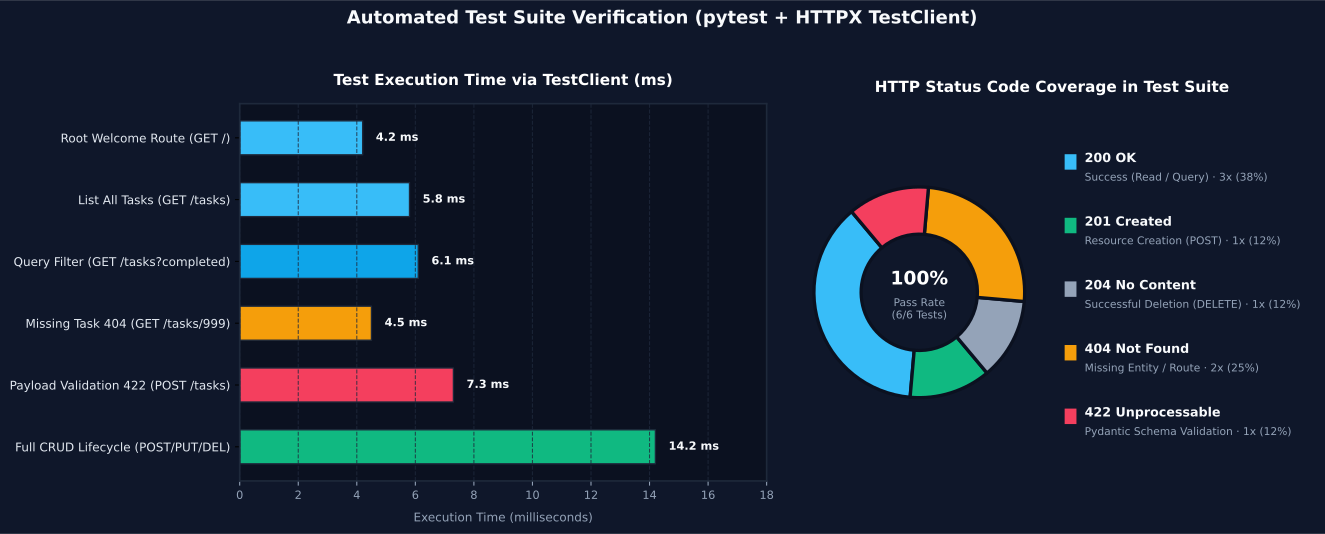
uv run pytest -vOutput:
============================= test session starts =============================
platform win32 -- Python 3.12.x, pytest-8.3.x
collected 6 items

test_main.py::test_root_endpoint PASSED                                  [ 16%]
test_main.py::test_list_tasks PASSED                                     [ 33%]
test_main.py::test_filter_incomplete_tasks PASSED                        [ 50%]
test_main.py::test_get_missing_task PASSED                               [ 66%]
test_main.py::test_crud_lifecycle PASSED                                 [ 83%]
test_main.py::test_reject_empty_task_title PASSED                        [100%]

============================== 6 passed in 0.08s ==============================
All six tests pass in just 80 milliseconds.
13. Final Project Structure
Our project is now fully assembled and self-contained:
task-api/
├── .venv/               # Virtual environment managed by uv
├── .python-version      # Python 3.12 pin
├── main.py              # Application, Pydantic schemas, and CRUD routes
├── test_main.py         # Automated pytest test suite
├── pyproject.toml       # Direct dependencies and build metadata
└── uv.lock # Pinned lockfile| Component | Architecture Role | Key Responsibilities |
|---|---|---|
main.py | Application Core | Implements ASGI router, Pydantic schemas, and in-memory store. |
test_main.py | Quality Assurance | Verifies status codes, JSON response shapes, and validation limits. |
pyproject.toml | Project Declaration | Declares dependencies (fastapi[standard], pytest, httpx). |
uv.lock | Deterministic State | Guarantees byte-for-byte reproducibility across developers and CI runners. |
14. Moving from Prototype to Production: What’s Missing?
While our API is functionally complete and demonstrates all core REST concepts, it is an educational foundation. Before deploying a backend to production, several key areas require additional engineering:
14.1 Persistent Storage (Database)
Currently, state lives inside an in-memory dictionary (tasks: dict[int, Task]). Every time the Python process restarts, any created tasks vanish. In a real-world system, you would integrate a relational database (e.g., PostgreSQL with SQLAlchemy or SQLModel) to provide ACID transactions, foreign keys, and persistent disk storage.
14.2 Authentication & Authorization
Anyone with network access to our port can modify or delete tasks. Production services require authentication (e.g., OAuth2 with JWT bearer tokens or API keys) to confirm the caller’s identity, coupled with role-based authorization to ensure users can only modify their own tasks.
14.3 Production Server Architecture
fastapi dev is built for local development with auto-reloading. For production deployments, you run Uvicorn behind a battle-tested reverse proxy (such as Caddy or Nginx) or deploy containerized instances behind a cloud load balancer:
uv run uvicorn main:app --host 0.0.0.0 --port 8000 --workers 414.4 Configuration & Secrets Management
Hardcoding configuration inside main.py does not scale. Modern applications leverage pydantic-settings to read database connection strings, environment variables, and API keys securely from the operating environment.
15. Common Troubleshooting Scenarios
| Issue Observed | Root Cause | Solution |
|---|---|---|
fastapi: command not found | The CLI was not installed or invoked outside uv environment. | Run uv add "fastapi[standard]" followed by uv run fastapi dev main.py. |
404 Not Found on valid route | HTTP method mismatch (e.g. sending POST to a GET path) or missing ID. | Verify HTTP verb and route in /docs interactive Swagger. |
422 Unprocessable Entity | Request payload violated Pydantic model constraints. | Inspect response detail array; check field names and min_length. |
Port 8000 already in use | Another server instance or background process is bound to port 8000. | Start with an alternate port: uv run fastapi dev main.py --port 8001. |
pytest: command not found | Test dependencies not synced. | Run uv add --dev pytest httpx then uv sync. |
Conclusion
Building a REST API is the crucial transition point where standalone Python scripts transform into modular services that can power web applications, mobile platforms, and AI ecosystems.
By combining uv and FastAPI, we established a modern, friction-free Python engineering workflow:
- uv handled virtual environments, runtime selection, and locked dependencies in fractions of a second.
- FastAPI transformed simple Python type hints into a self-validating HTTP layer with automatic OpenAPI documentation.
- Pydantic guarded data integrity at the system boundary.
- pytest & HTTPX provided automated validation in under 100 milliseconds.
With these foundations mastered, you have a solid launchpad to build scalable microservices, integrate database layers, and connect your Python backends to the broader software world.
References & Further Reading
Related Articles
More writings on Backend Engineering and related technologies.
From a Python Script to a Real Project: A Practical Workflow with uv
Learn how to transform a scrappy Python script into a structured, maintainable, and testable CLI application using uv. We build Text Inspector from the ground up with modular code, CLI entry points, and automated pytest suites.

Understanding pyproject.toml, uv.lock, and .venv: How uv Manages Python Projects
Demystifying the foundational triad that makes modern Python projects structured, reproducible, and portable across machines. Learn how configuration, lockfiles, and virtual environments work together under the hood.